CygNet Measurement Data Calculation
Calculation functionality is at the core of the CygNet Measurement application. Field values are received by the application and calculations are performed to generate corrected volume and energy values, and are used for validation of measurement data. Rollups are performed at station and group levels in support of operations and business functions.
The following calculation elements contribute to accurate measurement data calculations across the application.
- Data Spreading
- Data Aggregation
- Processing of User Edits
- Calculation Types
- Recalculation
- Calibration Recalculation
Data Spreading
In CygNet Measurement you can enter daily/monthly data and have that data spread over the specified time period (e.g. to generate hourly records). Data entered at any span greater than the native span will be spread to the native span, which accommodates circumstances where the choice is made to enter daily/monthly data, or where hourly data may be unavailable.
Data spreading applies to the following editable history data items.
- Energy - eFMS_PV_ACCUM_ENERGY
- Mass - eFMS_PV_FLOW_MASS
- Flow Time - eFMS_PV_FLOW_TIME
- Volume - eFMS_PV_FLOW_VOLUME
- Integral Value - eFMS_PV_IV
- Pulse Count - eFMS_PV_PULSES
- Uncorrected Volume - eFMS_PV_UNCORRECTED_VOLUME
See Using the History Grid Control and Editable Data Items for more information.
Data Aggregation
Aggregation of device-level data varies. Sometimes it is summed (e.g. volume, energy) and sometimes it is averaged (e.g. pressure, temperature). The summation logic is simple, whereas the averaging logic is more complex.
Averaging Liquid Device Data
API 21.2 addresses averaging in the context of liquid device data. CygNet Measurement meets these requirements by ensuring that all averaging is "time-based" averaging (per section 9.2.13) to yield a weighted average for the volume, and specifically that if there is no flow time during the entire period being averaged, then a simple average will be used.
Volume-weighted or Mass-weighted
The following formula is used to calculate the weighted average, using the (volume-weight or mass-weight) time-based method:
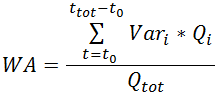
where:
WA = weighted average of a variable value (Var) for the total volume/mass measured
Vari = value of the variable sampled at time interval i
Qi = volume/mass measured during time interval i
Qtot = total volume/mass measured
ttot = total time interval
Averaging Gas Device Data
API 21.1 addresses averaging in the context of gas device data. CygNet Measurement meets these requirements by ensuring that all averaging is "flow time linear" averaging and specifically that if there is no flow time during the entire period being averaged, then a simple average will be used.
Note: One notable exception to these rules is the Volume Correction Factor (VCF) field. Since it directly relates to volume, it is averaged using a volume-weighted technique instead of flow time. This field is system calculated, not returned by the device, therefore API 21.1 rules don't apply. See Volume Correction Factor in the CygNet Measurement Concepts topic for more information.
Averaging Gas Station Data
Aggregation of station level data also uses volume-weighted averaging. If there is no volume for the entire period, then a simple average is performed. Since station data can have negative values, the volume-weighted technique uses the absolute value of the volumes.
See CygNet Measurement Concepts for more information about the concepts of device data and station data in CygNet Measurement.
Processing of User Edits
Given the type of user edit, the following processing is performed.
| User Edit Type | Processing Performed |
|---|---|
|
Volume, Energy, Mass |
If edited value is Volume or Mass, calculate Energy |
|
Periodic Metering Process Variable |
If edited value is used by the calculation type for the device, calculate Volume, Energy, and/or Mass value |
|
Periodic Quality Process Variable |
If edited value is used by the calculation type for the device, calculate Volume, Energy, and/or Mass value |
Calculation Types
CygNet Measurement supports a single set of gas metering/gas quality/gas analysis historical data calculations for a specified device, depending on its corresponding internal calculations.
The following calculation types are described in this section.
Gas Quantity Calculations
Energy
Given the corrected volume from the gas flow computer and the heating value from the chromatograph or imported gas analysis, the application calculates the amount of energy delivered, using either Heating Value or Mass, as follows.
The following formula is used to calculate Energy, using Heating Value Volume:
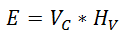
where:
E = Energy
Vc = Corrected Volume
Hv = Heating Value Volume
The following formula is used to calculate Energy, using Heating Value Mass:
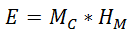
where:
E = Energy
Mc = Corrected Mass
HM = Heating Value Mass
Mass
Where mass is measured directly, the following calculations can be applied to obtain volume by using temperature, pressure, mole weight, and compressibility values.
- AGA 11 (coriolis meters)
Corrected Volume
Where raw volume values are not compensated for pressure and temperature for devices that return gas metering history, the following corrected volume calculations can be applied.
- AGA 3 1985 (orifice meters)
- AGA 3 1992 (orifice meters)
- AGA 3 2013 (orifice meters)
- AGA 7 (pulse meters - turbine, ultrasonic meters)
- Cone
- Wafer cone
Physical Properties Calculations
Heating Value Volume, Relative Density, and Hydrocarbon Liquid Content
Calculations of gas analysis physical property information include heating value volume (HVV,* for Wet, Dry, and As delivered), relative density, and liquid content of hydrocarbons (as GPM values), complying with the following calculation standard.
- GPA 2172-09
- GPA 2145-16
Editing a configured value for device base conditions (Temperature or Pressure) or heating value basis triggers a recalculation of values for relative density and liquid content of hydrocarbons. When this occurs, recalculations are based on heating value basis as follows:
- HVV is recalculated based on the heating value basis as configured in the device (configured value)
- Relative density and liquid content of hydrocarbons are recalculated based on the heating value basis as delivered with the gas analysis sample (imported gas analysis value)
See Using the Configuration Control for more information about managing configuration log and gas analysis data.
*CygNet Measurement calculates HVV as "real" rather than "ideal" values. This is distinguished by how compressibility is handled. HVV ("real") heating value volume accounts for the compressibility value in its calculation, whereas GHV ("ideal") gross heating value assumes a compressibility factor of 1.
Note: Although values may be shown in CygNet Measurement and elsewhere with up to 10 places of decimal precision, calculation precision and uncertainty is as reported for GPA 2172-09, "The properties... derive from experimental measurements that, in general, are accurate to no better than 1 part in 1000." Refer to GPA Standard 2172-09, API Manual of Petroleum Measurement Standards, Chapter 14.5 for more information.
Supercompressibility
Supercompressibility calculations take into account how different gas compositions compress. These differences can be applied to corrected volumes using the following supercompressibility calculations.
- AGA 8 Detailed 1992
- AGA 8 Gross Methods 1 & 2 1992
- NX 19 Gravity/Carbon/Nitrogen (GCN) Method 1962
- NX 19 Complete 1962
Recalculation
Many configuration items affect data calculation. See Configuration and Gas Analysis Items that Trigger Recalculation for a list of the configuration items that will cause a recalculation of affected historical records.
Calibration Recalculation
Use of CygNet Dispatch to integrate the effects of calibration changes affecting your measurement records can also result in data recalculation, upon approval.
Given the calibration changes, the change in process variable values, ∆pv (for temp, DP, or SP), is calculated as follows using linear interpolation and averages.

The adjusted process variable value, ∆pvadj, is calculated as follows given its previous reported value and the calculated change.

where:
∆cn = sn - an
calibration change (delta) for the point n; the difference between the standard value and the as-found value
∆cn-1 = sn-1 - an-1
calibration change (delta) for point n-1, the point prior to point n; the difference between the standard value and the as-found value
sn-1 < pv flow < sn
assuming the process variable value falls between the standard values for points n and n-1
and:
pv = process variable value (for temperature, DP, or SP)
each process variable value, retrieved for the record span of the given device (hourly or daily), and between the effective date and the job complete date
n = ordinal value denoting the calibration data point
c = calibration value
s = standard value
a = as-found value
More:


